3. Robot Program
The example program implements a complete robot vision workflow: calibrating the camera to the robot, detecting objects, and moving to them. It is split into three URScript modules imported together with Generic wenglor interface.urpx.
Modules
| Module | Responsibility |
|---|---|
wenglor_examples |
The runnable example routines: single_detection, multi_detection, update_reference_frame. Also see User Configuration for the variables these routines read. |
wenglor_api |
One function per generic robot vision API command, plus calibration and validation orchestration (run_calibration, validate_calibration). |
wenglor_helpers |
Socket communication, pose-string conversion, reply/error checking, and the auto-calibration guard (calibrate_if_needed). |
Program flow
Each example routine first calls wenglor_helpers.calibrate_if_needed(), which runs a calibration if no calibration data is available on the device yet, then loads the relevant uniVision job and moves to g_detection_pose.
Calibration
The calibration process differs depending on whether the camera is mounted on the robot or not. The sections below describe only how the Polyscope X example performs each case.
Note
For the general calibration concepts — which calibration plate to use, how to choose and vary the poses, and how to read the reprojection error — see the wenglor Robot Server overview in the wenglor robot vision manual. The description here does not repeat them.
The poses are taught as WG_CALIB_POSE_1 … WG_CALIB_POSE_5; wenglor_api.run_calibration moves through each of them in sequence, calling wenglor_api.add_calibration_pose (which issues calibration:add[...]) at every pose:
optimovej(... WG_CALIB_POSE_1 ...)
wenglor_api_add_calibration_pose()
optimovej(... WG_CALIB_POSE_2 ...)
wenglor_api_add_calibration_pose()
... (through WG_CALIB_POSE_5) ...
wig_command = "calibration:calculate[" + WG_USE_CASE + "," + WG_CALIBRATION_TARGET + "];"
Add further calibration movements in wenglor_api.run_calibration if you need more than five poses (see Troubleshooting).
Camera on robot
For WG_USE_CASE == "camera_on_robot", run_calibration sets the detection pose to the first calibration pose automatically once calibration succeeds:
Camera not on robot
For WG_USE_CASE == "camera_not_on_robot", run_calibration performs an additional ground-calibration step after the hand-eye calibration: it moves to g_detection_pose, waits for operator confirmation that the calibration target has been placed on the object plane, then sends calibration:ground[WG_CALIBRATION_TARGET].
Verification
wenglor_api.validate_calibration performs an optional verification step once a calibration is present on the device (the second bit of state[WG_USE_CASE] is 1):
- Checks the camera/calibration state via
wenglor_api.update_camera_status(which sendsstate[WG_USE_CASE]). - Prompts the operator and moves to
g_detection_pose. - Sends
validate[WG_USE_CASE, current_tcp_pose]to the vision device. - Moves the robot to the returned calibration-target pose, offset upward by
WG_VALIDATION_OFFSET_Z_MMalong the tool Z axis, so the operator can visually confirm the result.
Prerequisite: the calibration plate must be visible from g_detection_pose. Add a call to wenglor_api.validate_calibration in the Main Program to use it — it is not called automatically by the example routines.
Note
For what a good calibration looks like (Z-axis orientation, expected reprojection error values), see the wenglor Robot Server overview in the wenglor robot vision manual.
Detection
After successful calibration, the program detects objects and moves the robot to the position the camera reports.
single_detection
Loads WG_FIND_OBJECTS_JOB, moves to g_detection_pose, sends detect[...], reads the shape model and additional value of the detected object, then moves the robot to the returned object pose:
- Loads
WG_FIND_OBJECTS_JOB(viawenglor_api.load_find_object_job). - Moves to
g_detection_pose. - Sends
detect[...](viawenglor_api.detect_objects). - Reads shape model and additional value of the detected object (
wenglor_api.read_shape_by_index,wg_shape_model,wg_additional_value). - Moves the robot to the returned object pose.
multi_detection
Same as single_detection, but iterates through every object returned by num_objects:get (via wenglor_api.read_num_objects), reading pose (wenglor_api.read_pose_by_index), shape, and additional value for each:
wg_object_index = 0
wenglor_api_detect_objects()
wenglor_api_read_num_objects()
while (wg_object_index < wg_num_objects_found):
  wenglor_api_read_pose_by_index()
  wenglor_api_read_shape_by_index()
  optimovel(wg_object_pose, ...)
  wg_object_index = wg_object_index + 1
end
update_reference_frame
See 4.6 Target Pose and Camera-to-Target Calibration in the wenglor robot vision manual for the underlying target:pose command.
- Loads
WG_FIND_TARGET_JOB, moves tog_detection_pose, and triggers a calibration-target detection viawenglor_api.detect_target(which sendstarget:pose[WG_USE_CASE, WG_CALIBRATION_TARGET, wig_tcp_pose_string]). - Creates (or updates) the frame
w_ref_frame, attached toworld. - On the first run (
WG_MACHINE_POSES_TAUGHT == False), the program stops so the operator can teachG_POSE_IN_MACHINErelative tow_ref_frame. SetWG_MACHINE_POSES_TAUGHTtoTrueand restart the program. - On subsequent runs, the robot moves to
G_POSE_IN_MACHINE.
This workflow lets you re-localize a machine or fixture automatically between runs without re-teaching downstream poses.
Note
wenglor_api also provides calibrate_to_target, wrapping calibration:target[WG_USE_CASE, WG_CALIBRATION_TARGET], to recalibrate the camera-to-target relation without writing a new calibration file — it is not called by any routine in this example, but is available for custom use cases. See 4.6 Target Pose and Camera-to-Target Calibration in the wenglor robot vision manual.
Selecting a routine
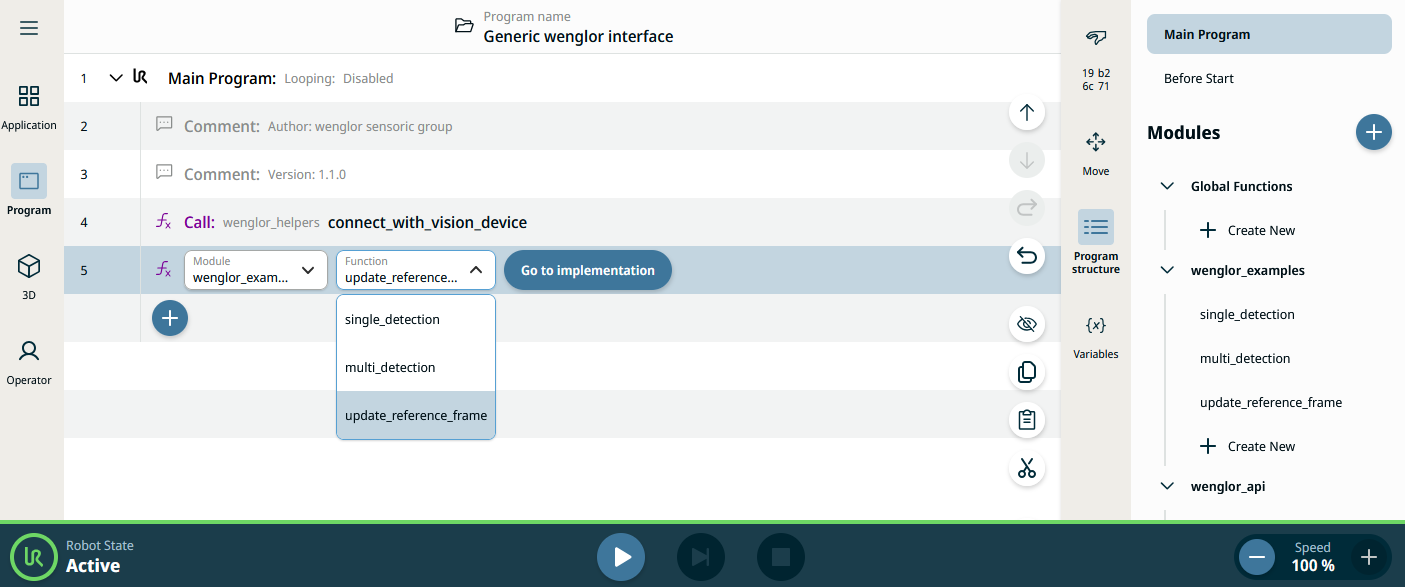
Navigate to the program tab and call either single_detection or multi_detection from the wenglor_examples module as the Main Program entry point. Select the TCP used for calibration, execute the program, and monitor the messages displayed on the teach pendant.
Units and conventions
- Positions in poses (
p[x, y, z, rx, ry, rz]) are in meters; rotations use the rotation-vector (Rodrigues) convention in radians — the same units used by the generic robot vision API, sowenglor_helpers.update_tcp_pose_stringandwenglor_helpers.string_to_poseonly need to format/parse the string, not convert units. wenglor_helpers.string_to_poseparses the comma-separatedx,y,z,rx,ry,rzreply into ap[...]pose by locating each comma withstr_findand slicing the string withstr_sub.