2. User Configuration
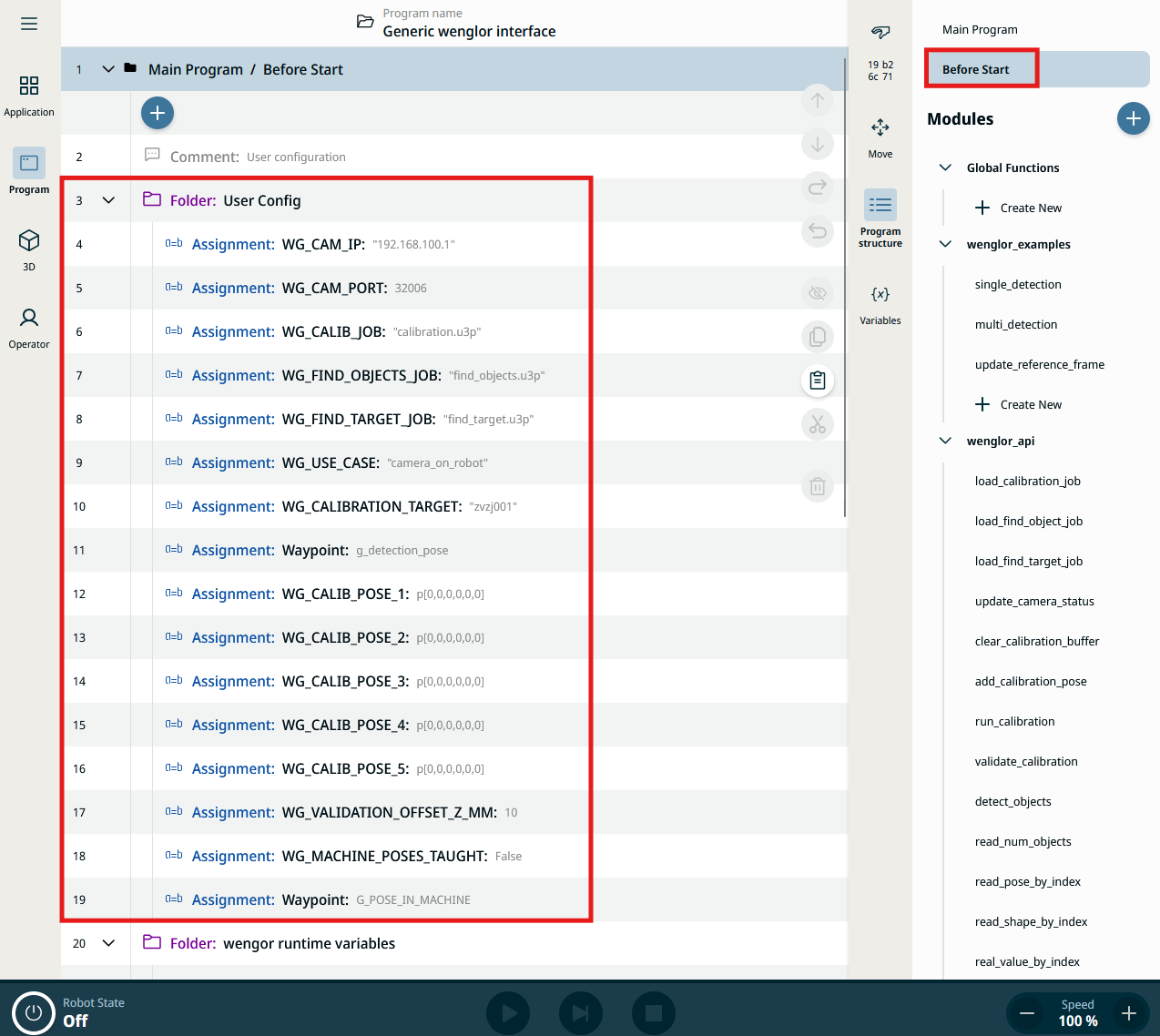
All parameters and poses you need to adapt to your setup are located in the Installation node tree under Before Start → User Config, in the Program tab. Update these values to match your use case before running the program.
Note
The screenshot above shows an earlier revision of the example that used lowercase g_* variable names (e.g. g_cam_ip, g_use_case). The current Generic wenglor interface.urpx uses the WG_* names documented below — the folder layout and workflow are otherwise unchanged.
Connection
| Variable | Description |
|---|---|
WG_CAM_IP |
IP address of the Machine Vision Device (by default 192.168.100.1). |
WG_CAM_PORT |
TCP port of the robot vision server (by default 32006). |
WIG_COMMAND_TIMEOUT |
Socket read timeout in seconds (by default 20). |
uniVision jobs
Configure three uniVision jobs. The suffix .u3p is mandatory and the name must not be wrapped in quotes.
| Variable | Description |
|---|---|
WG_CALIB_JOB |
Job used for calibration, loaded by wenglor_api.load_calibration_job (by default calibration.u3p). See Robot Program. |
WG_FIND_OBJECTS_JOB |
Job used by single_detection and multi_detection (by default find_objects.u3p). |
WG_FIND_TARGET_JOB |
Job used by update_reference_frame (by default find_target.u3p). |
Use case and calibration plate
| Variable | Description |
|---|---|
WG_USE_CASE |
Either camera_on_robot or camera_not_on_robot (by default camera_on_robot). |
WG_CALIBRATION_TARGET |
Defines the calibration plate (by default zvzj001). Select zvzj001 if using ZVZJ005, and zvzj002 if using ZVZJ006. |
Poses
Note
g_detection_pose and G_POSE_IN_MACHINE (see Reference frame workflow below) intentionally keep a different naming convention than the WG_*-prefixed variables elsewhere in the source program. This is not a documentation error — it reflects the actual variable names in Generic wenglor interface.urpx.
| Variable | Description |
|---|---|
g_detection_pose |
Pose the robot moves to for object detection and validation. Teach this pose. |
WG_CALIB_POSE_1 … WG_CALIB_POSE_5 |
The five calibration poses. Teach each pose — the template provides exactly five slots. |
To teach a pose, select Set Expression on the variable and change it to Edit Waypoint, then move the robot and save the pose.
Validation
| Variable | Description |
|---|---|
WG_VALIDATION_OFFSET_Z_MM |
Retract distance along the tool Z axis, in millimeters, when the robot approaches the detected calibration-target pose during validate_calibration. Provides a safety gap for visual inspection (by default 10). |
Reference frame workflow (update_reference_frame only)
| Variable | Description |
|---|---|
WG_MACHINE_POSES_TAUGHT |
Set to True after teaching poses relative to w_ref_frame (by default False). |
G_POSE_IN_MACHINE |
Pose expressed in w_ref_frame that the robot should move to once the machine reference frame has been updated (by default taught). |
The calibration poses and the dummy pose G_POSE_IN_MACHINE need to be taught the same way as g_detection_pose — via Set Expression → Edit Waypoint.
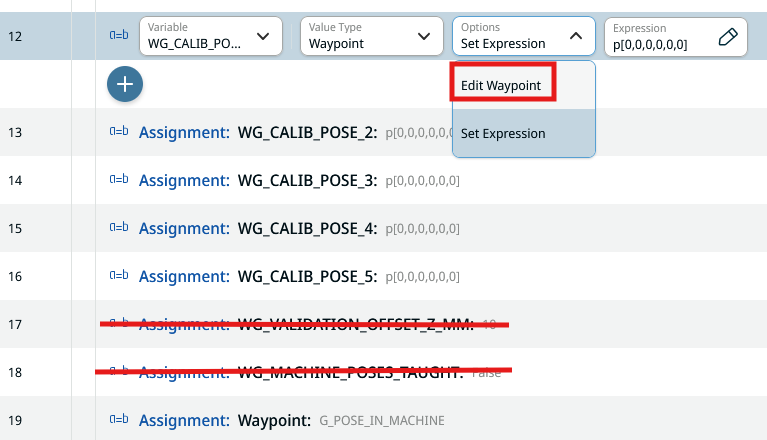
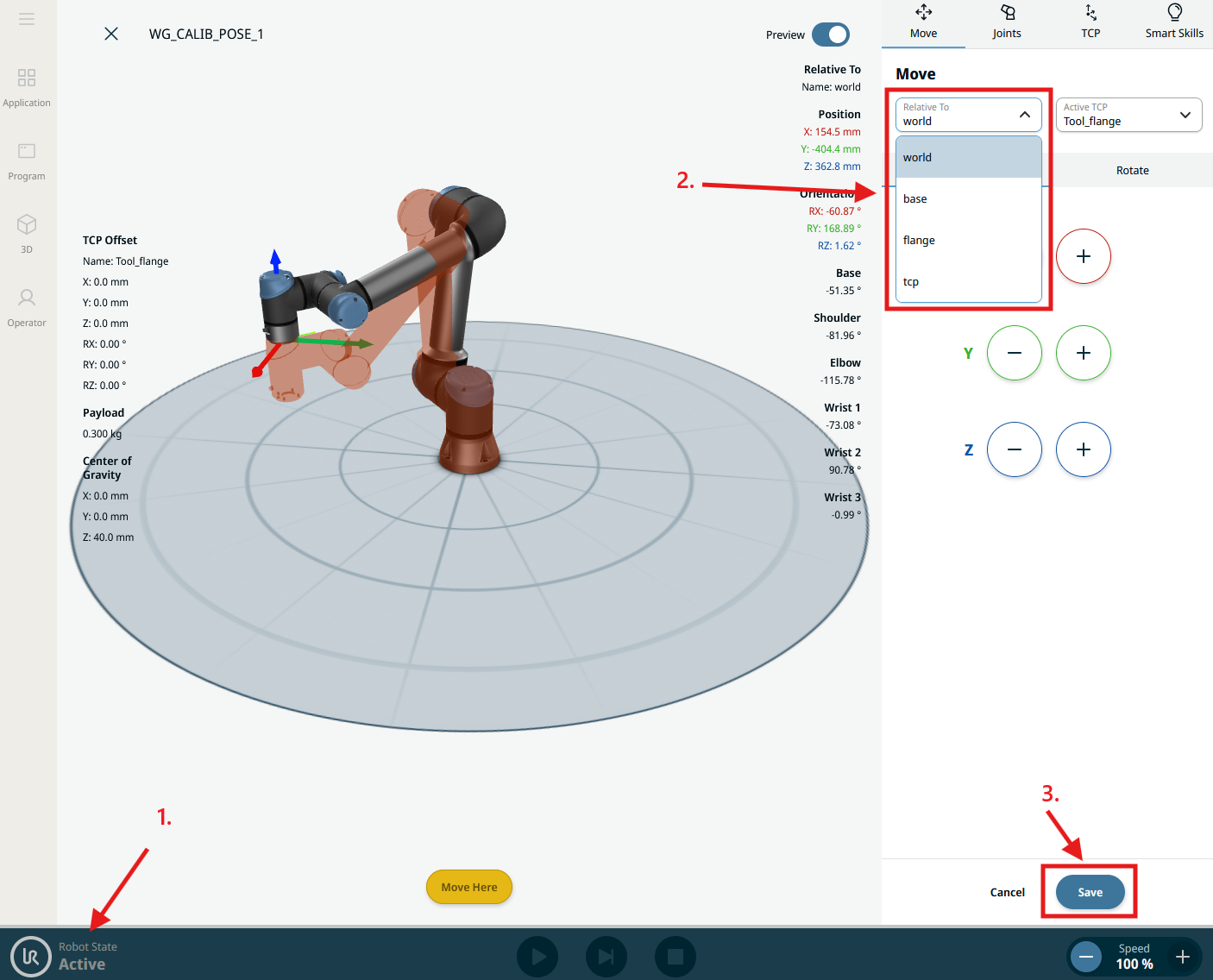
For G_POSE_IN_MACHINE, set the reference frame to w_ref_frame before teaching (w_ref_frame appears in the frame list only after update_reference_frame has run at least once); for all other poses, set it to world.
- The robot needs to be active to move it while teaching a pose.
- Select the correct reference frame for the pose being taught.
- Save the pose.
Note
Also make sure the robot manufacturer is set correctly on the Machine Vision Device website (tab Jobs → Robot Server). See Settings on Device Website in the wenglor robot vision manual.
Once configuration is complete, continue with Robot Program to run calibration and detection.