3. Robot Program
The example program implements a complete robot vision workflow: calibrating the camera to the robot, detecting objects, and moving to them. It is split into a KAREL backend (W_LIBRARY) that does the socket communication with the wenglor robot server, and TP programs that orchestrate the workflow.
Exchange registers
These are the default registers used to return values from the KAREL routines. They are editable via the KAREL variables (select the W_LIBRARY program). See User Configuration.
| Register | KAREL variable | Note |
|---|---|---|
R[60] |
w_exch_reg_1 |
Used for single and multiple output routines. Can contain BOOLEAN, INTEGER and REAL. |
R[61] |
w_exch_reg_2 |
Only used if two or more outputs are required. Can contain BOOLEAN, INTEGER and REAL. |
R[62] |
w_exch_reg_3 |
Placeholder for routines with more than two outputs. Can contain BOOLEAN, INTEGER and REAL. |
PR[60] |
w_pose_exch_reg |
Output pose, e.g. object pose or calibration target pose (validation). |
SR[60] |
w_string_exch_reg |
Output string, e.g. additional value or current uniVision job name. |
Callable KAREL routines
Call a routine with CALL W_LIBRARY('<routine>' [, <arg>]). The results are written to the exchange registers above.
| Routine | Input | Example | Output |
|---|---|---|---|
cam_status |
— | CALL W_LIBRARY('cam_status') |
w_exch_reg_1: 1 (calibration data found) or 0 (no calibration data). |
load_job |
1. job name | CALL W_LIBRARY('load_job','find_objects.u3p') |
— |
get_job |
— | CALL W_LIBRARY('get_job') |
w_string_exch_reg: name of active uniVision job. |
clear_calib_buffer |
— | CALL W_LIBRARY('clear_calib_buffer') |
— |
add_calib_pose |
— | CALL W_LIBRARY('add_calib_pose') |
— |
calc_calibration |
— | CALL W_LIBRARY('calc_calibration') |
w_exch_reg_1: reprojection error / accuracy of the intrinsic camera calibration. |
calib_to_ground |
— | CALL W_LIBRARY('calib_to_ground') |
— |
calib_to_target |
— | CALL W_LIBRARY('calib_to_target') |
— |
run_calibration |
— | CALL W_LIBRARY('run_calibration') |
— |
validate_calibration |
1. safety offset in mm (REAL) | CALL W_LIBRARY('validate_calibration', 10.5) |
Moves the robot to the target for visual validation. |
calibrate_if_needed |
1. safety offset in mm (REAL) | CALL W_LIBRARY('calibrate_if_needed', 10.5) |
Runs a calibration only if no calibration data is present. |
detect_objects |
— | CALL W_LIBRARY('detect_objects') |
w_pose_exch_reg: object pose at Result List index 0 of the uniVision Device Robot Vision. |
detect_target |
— | CALL W_LIBRARY('detect_target') |
w_pose_exch_reg: calibration target pose. |
num_objects |
— | CALL W_LIBRARY('num_objects') |
w_exch_reg_1: number of found objects. |
pose_by_index |
1. index of object | CALL W_LIBRARY('pose_by_index',R[11]) |
w_pose_exch_reg: object pose for the given index. |
shape_by_index |
1. index of object | CALL W_LIBRARY('shape_by_index',R[11]) |
w_exch_reg_1: shape model ID for the object with the given index. |
value_by_index |
1. index of object | CALL W_LIBRARY('value_by_index',R[11]) |
w_string_exch_reg: additional value for the object with the given index. |
Note
The KAREL routines are thin wrappers around the generic string based robot vision API. For the underlying commands, return values, and error codes, see the Generic Robot Vision Interface in the wenglor robot vision manual.
Note
detect_target and calib_to_target wrap the target:pose and calibration:target commands, used to detect a calibration target's pose or recalibrate the camera-to-target relation without writing a new calibration file (e.g. for mobile platforms, see W_UPDATE_REFERENCE_FRAME below). See Target Pose and Camera-to-Target Calibration in the wenglor robot vision manual.
Units and conventions
The generic robot vision API uses the following conventions, which the KAREL library maps to the FANUC representation:
- Positions
x, y, zare exchanged in meters; FANUC works in millimeters. - Orientations
rx, ry, rzare exchanged as a rotation vector (Rodrigues convention, in radians); FANUC uses W, P, R Euler angles.
See the command tables in the Generic Robot Vision Interface in the wenglor robot vision manual.
Program structure
| File | Responsibility |
|---|---|
w_library.pc |
KAREL library. Socket communication with the robot server, calibration, detection, pose conversions, error handling, and all user-adjustable variables. See User Configuration. |
w_single_detect.tp |
Calibrates if needed, loads the detection job, moves to the detection pose, detects a single object and moves to it. |
w_multi_detect.tp |
Fills the buffer, reads the number of objects, and iterates over all detected objects. |
w_update_reference_frame.tp |
Detects the calibration target and updates a reference frame (e.g. for mobile platforms). |
w_move.tp |
Helper that moves the robot to the exchange pose register, PTP or LIN depending on w_use_ptp_reg. |
The KAREL backend takes TP call parameters as inputs and returns its values to global registers.
Calibration and validation process
If no calibration file is available on the Machine Vision Device, the example program starts the calibration process automatically. Select either W_SINGLE_DETECT, W_MULTI_DETECT, or W_UPDATE_REFERENCE_FRAME to run it.
The calibration process uses user prompts. To see them, go to Menu → User.
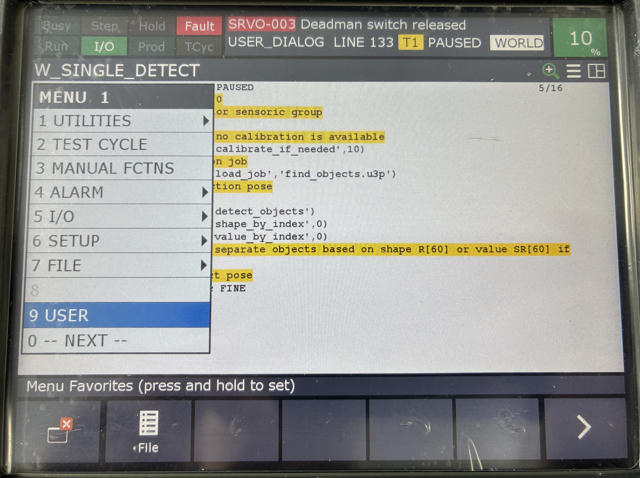
Use SHIFT + F1 to answer YES and SHIFT + F2 to answer NO. The program must be active so it can read the input, so in total Deadman switch + SHIFT + F1 (or F2) must be pressed at the same time.
The program returns the registered user input. After this, the calibration movement starts. When the calibration is done, the reprojection error is returned.
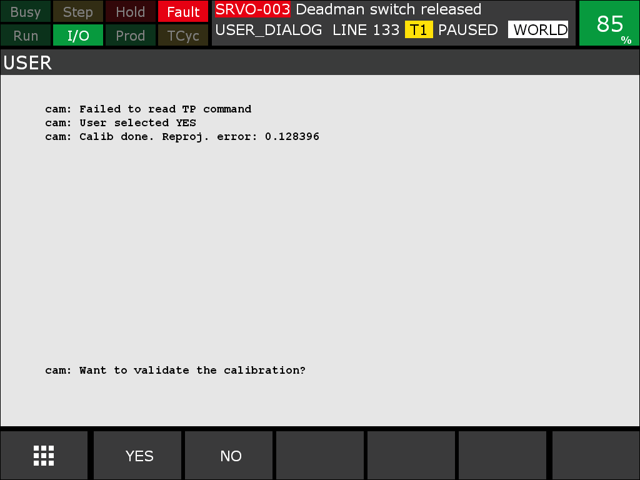
For the optional validation, the robot first moves to the detection pose as a safe retreat pose, then moves to the bottom-left corner of the calibration plate. By default, a safety offset is applied (adjustable via the KAREL variable), so the robot moves above the calibration plate.
Note
For what a good calibration looks like (Z-axis orientation, expected reprojection error values), see the Wenglor Robot Server overview in the wenglor robot vision manual.
Camera on robot
The detection pose is set during the calibration and is also used for the validation. Teach a minimum of five calibration poses (seven to eleven for better accuracy).
Camera not on robot
The detection pose must be set by the user (see User Configuration). It also serves as the retreat pose after the calibration movement. During this movement you remove the calibration plate from the robot and place it on the object plane; the same pose is used for validation.
TP programs
Set up your TP program with the KAREL routines described in Callable KAREL routines. You can also use the provided example programs W_SINGLE_DETECT, W_MULTI_DETECT or W_UPDATE_REFERENCE_FRAME.
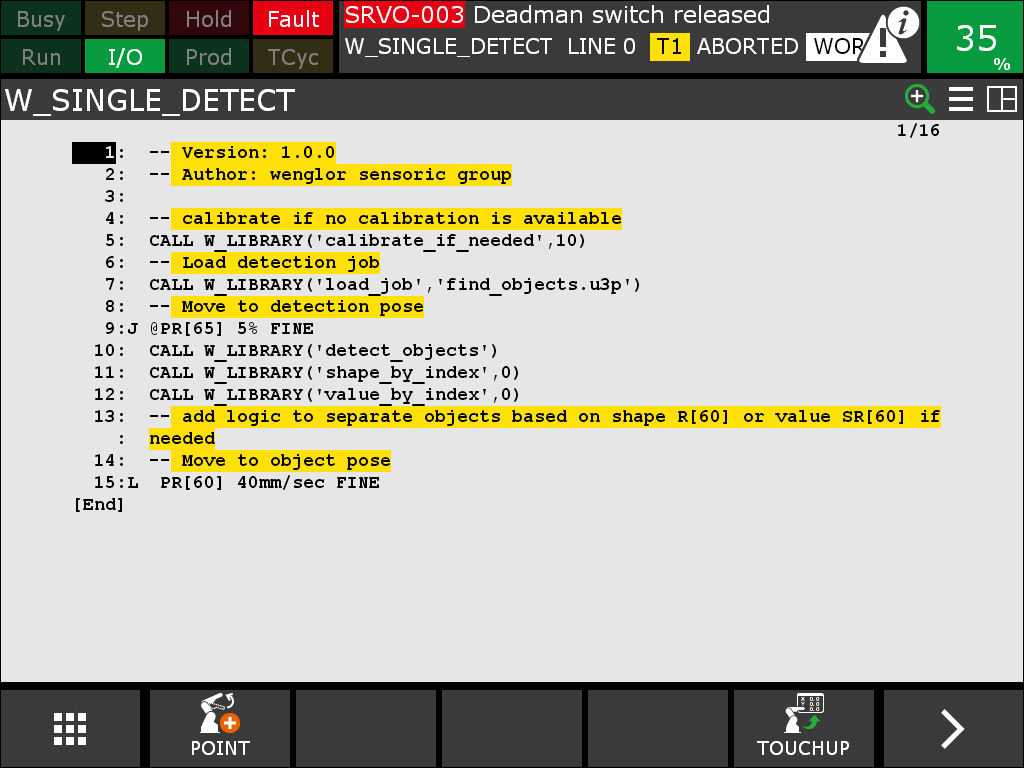
W_SINGLE_DETECT
Calibrates if no calibration data is available, loads the detection job, moves to the detection pose, requests a single object pose, and moves to it:
  ! Calibrate if no calibration data is available
  CALL W_LIBRARY('calibrate_if_needed', 10.5)
  ! Load detection job
  CALL W_LIBRARY('load_job','find_objects.u3p')
  ! Move to detection pose PR[65]
  ...
  ! Detect a single object; the pose is returned in PR[60]
  CALL W_LIBRARY('detect_objects')
  ! Move to the detected object
  CALL W_MOVE
W_MULTI_DETECT
Calibrates if needed, loads the detection job, moves to the detection pose, fills the camera-side buffer, reads the number of objects, and iterates over all detected objects:
  CALL W_LIBRARY('calibrate_if_needed', 10.5)
  CALL W_LIBRARY('load_job','find_objects.u3p')
  ...
  ! Fill the buffer with a detection
  CALL W_LIBRARY('detect_objects')
  ! Read the number of objects into R[60]
  CALL W_LIBRARY('num_objects')
  ! Abort if no object was found
  IF R[60]=0, JMP LBL[...]
  ! Iterate over all objects (the vision API index is 0-based)
  FOR R[2]=0 TO (R[60]-1)
    CALL W_LIBRARY('pose_by_index',R[2])
    ! Optionally read the shape model / additional value
    CALL W_LIBRARY('shape_by_index',R[2])
    CALL W_LIBRARY('value_by_index',R[2])
    CALL W_MOVE
  ENDFOR
You can extend this with conditional checks on the shape model or the additional value (link the additional value in the uniVision Device Robot Vision before using value_by_index).
W_UPDATE_REFERENCE_FRAME
Used for mobile platforms and similar use cases (e.g. correcting positional deviations of a mobile platform in front of a machine or shelf). It calibrates if needed, loads the target-detection job, detects the calibration target, and updates a user frame that your machine poses are taught relative to.
  CALL W_LIBRARY('calibrate_if_needed', 10.5)
  ! Load find_target job, as it detects the reference frame
  CALL W_LIBRARY('load_job','find_target.u3p')
  ! Detect the calibration target; the pose is returned in PR[60]
  CALL W_LIBRARY('detect_target')
  ! Update the user frame with the detected pose, then move to the taught machine poses
  ...
On the first run, set/teach the machine poses relative to the updated reference frame, then re-run the program.
Note
You may want to use a dedicated user frame for this use case. Replace the placeholder machine poses with your own.
W_MOVE
Helper program that moves the robot to the exchange pose register (PR[60] by default). It checks whether PTP is enabled via the register configured in w_use_ptp_reg (default R[63]): 1 → PTP (joint) motion, 0 → LIN (linear) motion.