2. User Configuration
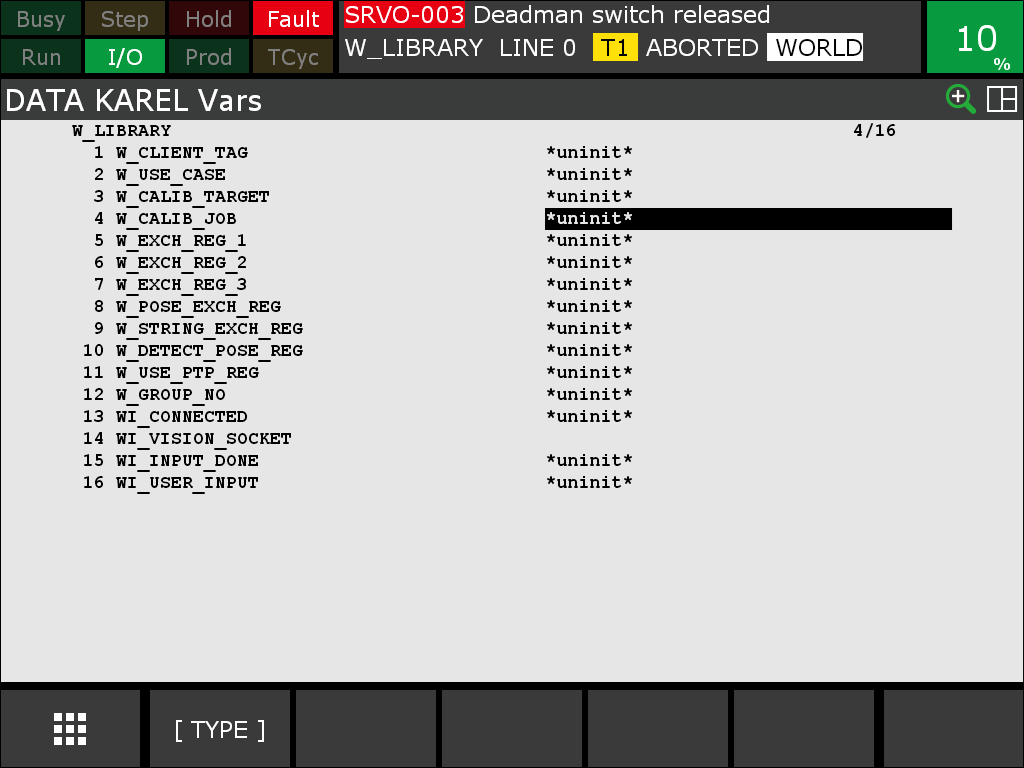
All parameters you need to adapt to your setup are KAREL variables of the W_LIBRARY program. Adjust them according to your needs before running the example.
To access the KAREL variables, select the corresponding PC file W_LIBRARY, then go to Data → Type (bottom bar) → Karel Vars.
Note
The variables are uninitialized until you run W_LIBRARY once. See Installation & Setup → Initialize the KAREL variables.
User configurable KAREL variables
The following variables (prefix w_) can be adjusted under Data → Karel Vars after selecting the KAREL program W_LIBRARY.
| Variable | Default | Note |
|---|---|---|
w_client_tag |
C1: |
Host Comm client tag configured for the vision device (see Socket messaging). |
w_use_case |
camera_on_robot |
Either camera_on_robot or camera_not_on_robot. |
w_calib_target |
zvzj002 |
ID of calibration target (zvzj001, zvzj002, zvzj003, zvzj004). |
w_calib_job |
calibration.u3p |
uniVision job for calibration. |
w_exch_reg_1 |
60 |
Primary output register (R) for BOOLEAN / INTEGER / REAL. |
w_exch_reg_2 |
61 |
Secondary output register (R). |
w_exch_reg_3 |
62 |
Tertiary output register (R). |
w_pose_exch_reg |
60 |
Output pose register (PR). |
w_string_exch_reg |
60 |
Output string register (SR). |
w_detect_pose_reg |
65 |
Detection pose register (PR) — keep in sync with the PR referenced by the TP programs. |
w_use_ptp_reg |
63 |
Register (R) used to switch W_MOVE between PTP (1) and LIN (0). |
w_group_no |
1 |
Robot group number. |
Warning
Variables with a wi_ prefix are internal and must not be changed.
Calibration poses (W_CALIB_POSES)
| Variable | Note |
|---|---|
w_calib_poses |
Array of up to eleven XYZWPR calibration poses (minimum five required). Set under Data → Karel Pos. |
The KAREL library exchanges registers to write the results of the commands. Please check whether these registers conflict with your own register usage and change them if required.
Set the calibration and detection poses
Set up a maximum of eleven calibration poses (at least five). Depending on the use case, the detection pose is handled differently:
- Camera on robot: The detection pose is set during calibration and is also used for validation.
- Camera not on robot: The detection pose must be set by the user. It also serves as the retreat pose after the calibration movement. During this movement you remove the calibration plate from the robot and place it on the object plane; the same pose is used for validation.
- Both cases: Set the detection pose in a global register. By default, pose register 65 (
PR[65]) is used, as shown in the provided example programsW_SINGLE_DETECTandW_MULTI_DETECT.
Select the KAREL file W_LIBRARY → Data → Karel Pos → W_CALIB_POSES.
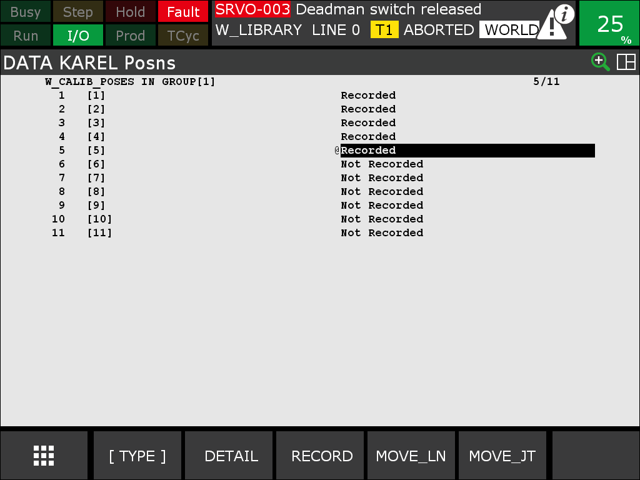
Set the detection pose. By default, pose register PR[65] is used. If PR[65] is used for other purposes, you can pick another PR, but then you need to update the TP programs accordingly. If you change the detection pose register, also update the w_detect_pose_reg KAREL variable.
![Detection pose PR[65]](../images/set_detection_pose.png)
Note
For the general calibration concepts — which calibration target to use, how to choose and vary the poses, and how to read the reprojection error — see the Wenglor Robot Server overview in the wenglor robot vision manual. They are not repeated here.