2. User Configuration
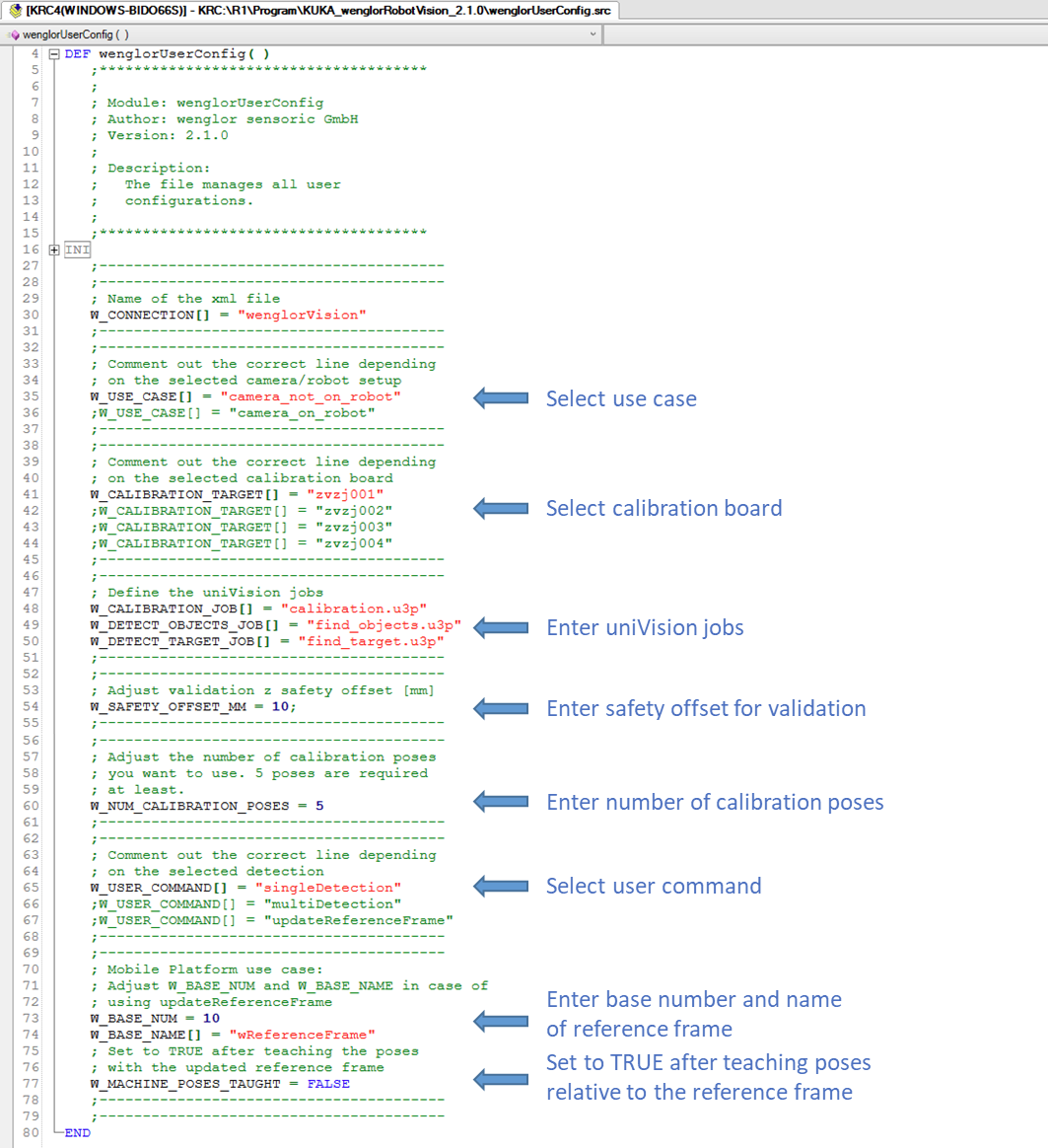
All parameters you need to adapt to your setup are located in the wenglorUserConfig module. Adjust them according to your needs before running the program.
Parameters
Edit the following parameters in wenglorUserConfig.src:
| Parameter | Description |
|---|---|
W_CONNECTION[] |
Name of the EthernetKRL channel. Must match the name of the wenglorVision.xml file. By default, the names already match — do not rename it. |
W_USE_CASE[] |
Defines whether the camera is on the robot or not (camera_on_robot or camera_not_on_robot). |
W_CALIBRATION_TARGET[] |
ID of the calibration plate: zvzj001, zvzj002, zvzj003, or zvzj004. Select zvzj001 if using ZVZJ005 and zvzj002 if using ZVZJ006 (same size). |
W_CALIBRATION_JOB[] |
Name of the uniVision job for calibration. |
W_DETECT_OBJECTS_JOB[] |
Name of the uniVision job for detection. |
W_DETECT_TARGET_JOB[] |
Name of the uniVision job for detecting the calibration plate (used by updateReferenceFrame). |
W_SAFETY_OFFSET_MM |
Z offset in millimeters for the validation of the calibration. |
W_NUM_CALIBRATION_POSES |
Number of calibration poses to use. At least 5 poses are required, and the value must match the number of poses taught in moveTocalibrationPose(). |
W_USER_COMMAND[] |
The routine to execute (singleDetection, multiDetection, or updateReferenceFrame). |
W_BASE_NUM |
Base number used for the reference frame in the updateReferenceFrame use case. |
W_BASE_NAME[] |
Name of the reference frame base (wReferenceFrame by default). |
W_MACHINE_POSES_TAUGHT |
Set to TRUE after teaching the poses relative to the reference frame in the updateReferenceFrame use case. See Robot Program → updateReferenceFrame. |
Mobile platform use case
For the mobile platform use case (updateReferenceFrame), also set W_BASE_NUM, W_BASE_NAME[], and W_MACHINE_POSES_TAUGHT as described in the table above. For the general concept, see Wenglor Robot Server overview in the wenglor robot vision manual.
Teaching the poses
The movements to the robot poses are defined in the pose procedures of wenglorUserConfig.src. Add the movements to your taught poses inside them:
| Procedure | Purpose |
|---|---|
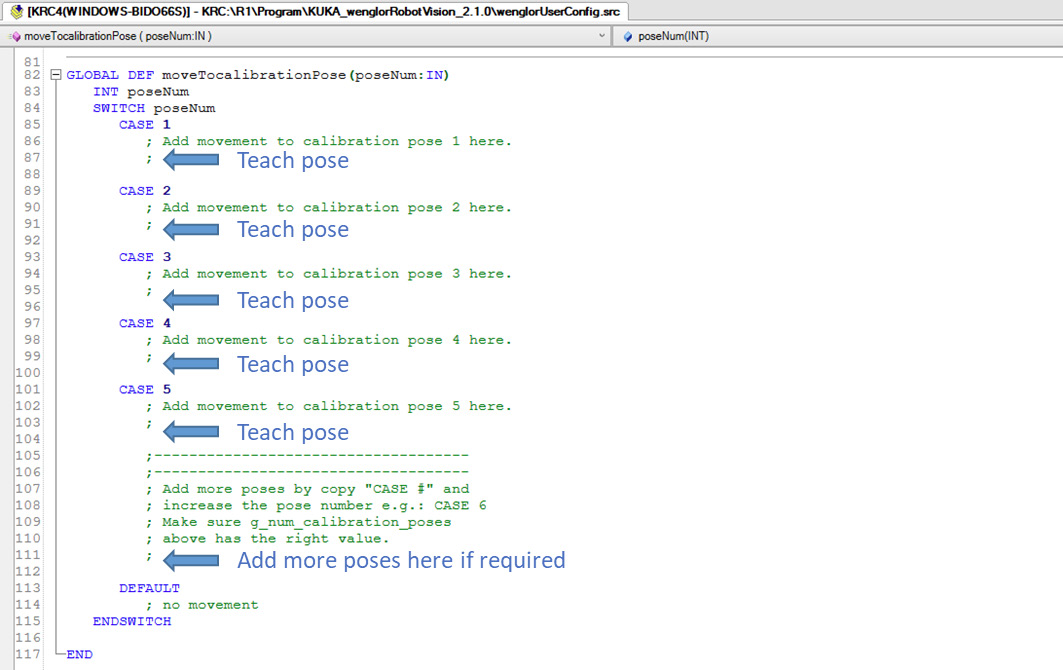
moveTocalibrationPose(poseNum) |
Moves to each calibration pose (CASE 1 … CASE 5). Add or remove CASE blocks to match W_NUM_CALIBRATION_POSES. |
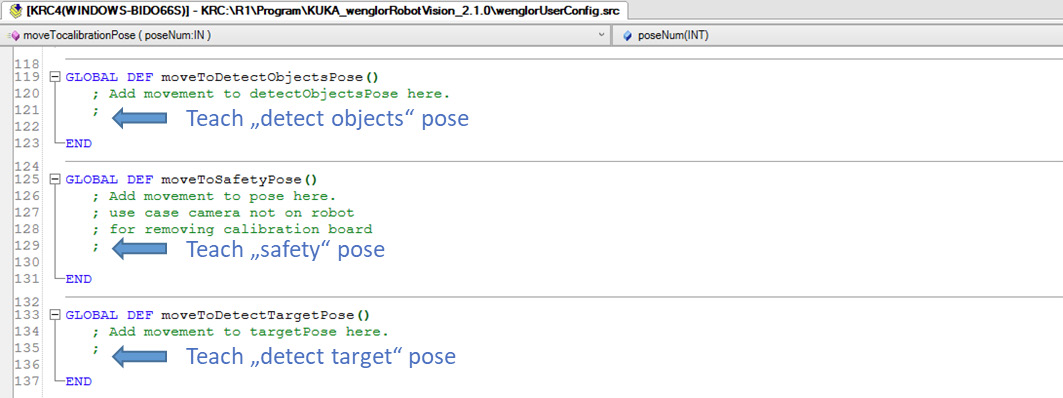
moveToDetectObjectsPose() |
Moves to the detection pose used for object recognition. |
moveToSafetyPose() |
Moves to a safety pose so the operator can remove the calibration plate (camera_not_on_robot only). |
moveToDetectTargetPose() |
Moves to the pose from which the calibration target is detected (updateReferenceFrame only). |
Teach a minimum of five calibration poses (more can be added for better accuracy) in moveTocalibrationPose().
Note
The number of taught poses must match W_NUM_CALIBRATION_POSES. To add poses, copy a CASE block in moveTocalibrationPose(), increase the pose number, and update W_NUM_CALIBRATION_POSES accordingly.
For the detection pose (moveToDetectObjectsPose()), the safety pose (moveToSafetyPose(), camera_not_on_robot only), and the target pose (moveToDetectTargetPose(), updateReferenceFrame only):
To test the calibration poses you can call the function testCalibrationPoses(). It must be called from wenglorMain.src.

For details on how these poses are used in the calibration and detection flow, see Robot Program.
Note
Also check that KUKA is selected in the robot manufacturer drop-down of the robot server on the Machine Vision Device website (e.g. B60, MVC). See Settings on Device Website in the wenglor robot vision manual.